
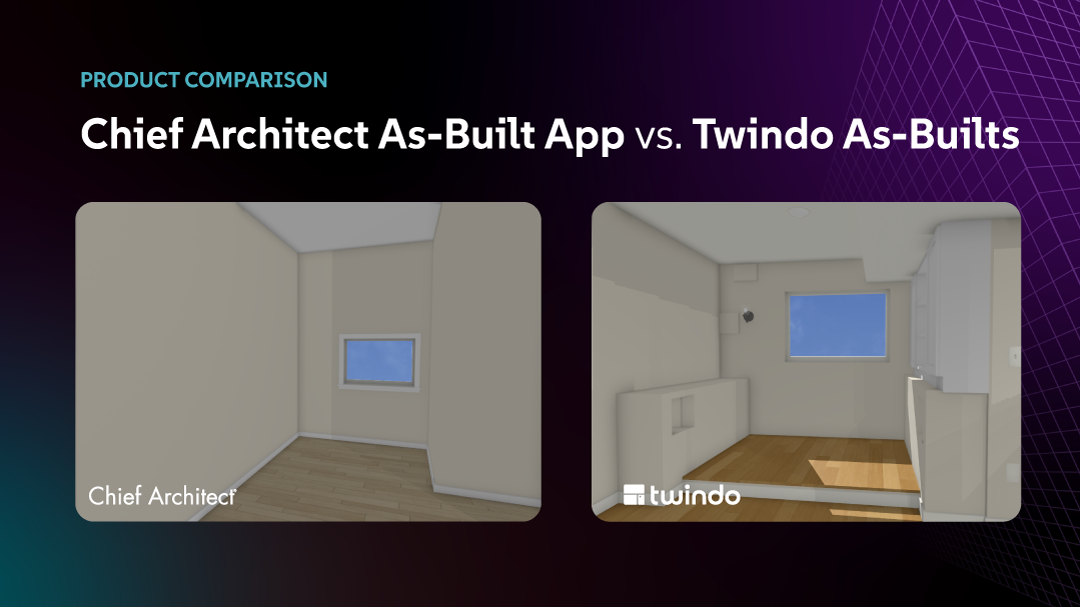
Chief Architect As-Built App vs. Twindo: How the Two As-Built Tools Compare
If you’re a design professional using Chief Architect, you’ve probably heard of Chief Architect’s new Chief As-Built scanning app. While both Twindo and Chief As-Builts allow you to scan spaces and import them into Chief Architect, it’s important to note the differences between the two apps and how they affect your design workflow.
Here’s the short answer: Chief As-Built is a do-it-yourself capture tool that drops a basic interior shell of simple spaces straight into Chief Architect, and is currently included with your Chief Architect subscription. This works best with single rooms or simple single-floor spaces.
Twindo is a Scan to CAD service, which combines proprietary scanning technology powered by more than 20 patents and trained human modelers to turn a scan (or multiple scans) into a layered, detailed up-to-99% accurate Chief Architect as-built model, complete with details such as electrical outlets and switches, HVAC registers, and existing cabinetry. Twindo can combine multiple scans across different floors of a building, resulting in less work to merge multiple scans/areas together.
Chief As-Built is fast and “free” with limited detail; Twindo costs money and takes a bit longer but delivers a finished, design-ready model.
What is the Chief As-Built App?
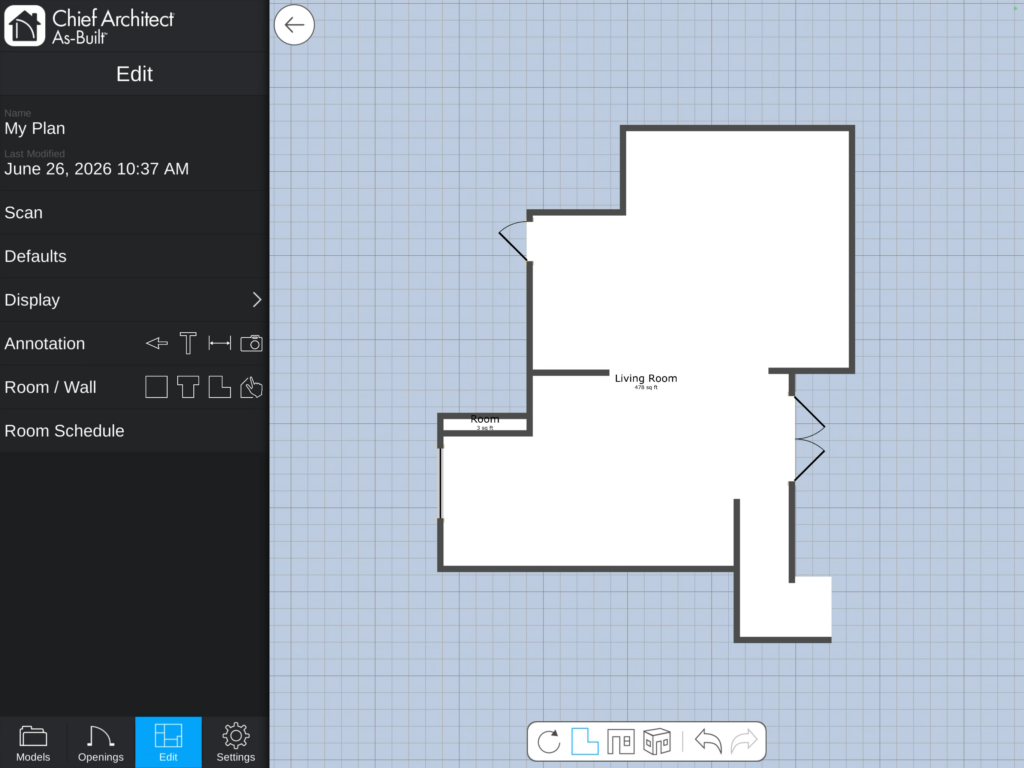
Chief As-Built App is a free iOS app from Chief Architect. You use a LiDAR-equipped iPad Pro or iPhone Pro to scan a room, then upload the result to the Chief Cloud and import it into Chief Architect Premier to start your remodel. You can also invite a client to scan their own space and share it with you.
Under the hood, the app is built on Apple’s RoomPlan framework. This is a built-in Apple feature that detects walls, windows, doors, openings, and simple furniture and outputs a 3D model on your device. Chief As-Built then allows you to edit dimensions directly in the app after scanning by typing in manual measurements or pulling in readings from a Bluetooth-connected laser distance meter. RoomPlan apps are limited to scanning a few rooms at a time.
What the app actually imports into Chief Architect is deliberately narrow: simplified walls, windows, doors, annotations, and dimensions for ceiling and window height.
What is Twindo?
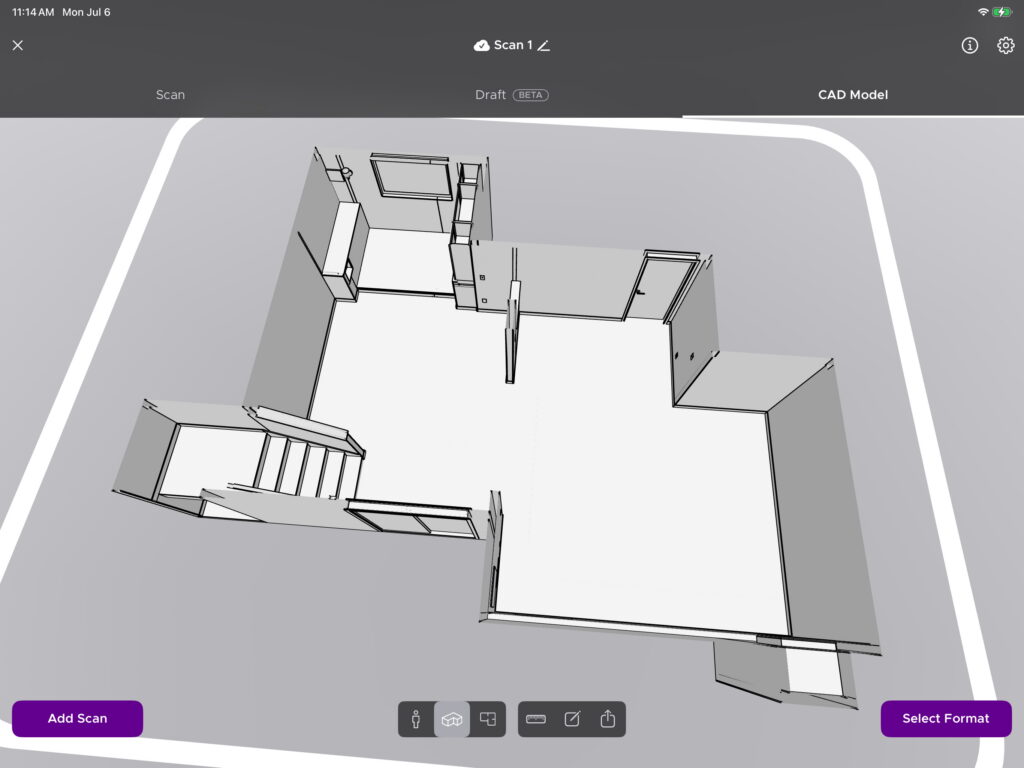
Design and construction pros choose Twindo for scanning and modeling as-builts because it is powerful enough to handle full, multi-level spaces and delivers high levels of detail and accuracy. They save time and avoid problems later because Twindo models capture important details like outlets, HVAC, and lighting. Twindo also documents site conditions with photos and a digital twin you can share with anyone over the web.
With Twindo, you can scan a space with a LiDAR-equipped iOS device for free, and even access a simplified Draft model (also powered by RoomPlan) within the app. You can also invite your clients, collaborators, or teammates to scan spaces on your behalf. The difference is that Twindo can then convert a scan (or scans) into a structured, design-ready as-built model optimized for Chief Architect.
The key distinction is that Twindo pairs advanced LiDAR capture with a human-in-the-loop modeling process to deliver far more detail. Twindo has proprietary scanning technology that enhances the scan in the cloud, developed over a decade and protected by more than 20 patents.
Once your scan is processed in the cloud, trained modelers using custom software turn your scan, plus optional supplemental photos and measurements you share, into a layered, detailed file that includes objects such as electrical switches and outlets, HVAC registers, and existing cabinetry. That’s why Twindo can deliver up to 99% accuracy and details that automated processing alone misses.
Twindo also isn’t tied to a single design program. It delivers as-builts in formats beyond Chief Architect, such as AutoCAD, SketchUp, Revit, 2020 Design, Archicad, Vectorworks, PDF, or a measurement report, which is a floor plan plus quantities and key dimensions of floors, walls, doors, windows, and countertops for bidding, takeoffs, and more. You scan; the model comes back ready for design.
Chief As-Built vs. Twindo: side-by-side comparison
| Capability | Chief As-Built | Twindo |
|---|---|---|
| How the model is built | Automated (Apple RoomPlan) + your manual edits | LiDAR scan + advanced algorithms + trained Chief Architect modelers |
| Detail captured | Walls, windows, doors, ceiling/window heights | Walls, windows, doors, cabinets, countertops, lighting fixtures, outlets and switches, fireplaces, and more (LOD 200) |
| Accuracy | RoomPlan-dependent*; refine with a Bluetooth laser * Twindo’s testing of RoomPlan scans showed ~7% error; the larger and more complex the space, the higher the error rate |
~99% accurate as-built models |
| Stairs | Not captured | Captured and modeled |
| Multiple floors | Scan each floor separately, stack and align manually in Chief Architect and then add stairs | Multistory supported; Twindo merges multiple scans to create a unified Chief Architect model |
| Vaulted / sloped ceilings & soffits | Not detected; add manually yourself later | Modeled by Twindo |
| Building Exteriors | No—interiors only | Supported, within the ~15 ft range of Apple’s LiDAR sensor |
| Output formats | Chief Architect only | Chief Architect, SketchUp, Revit, AutoCAD, 2020 Design, Archicad, Vectorworks, PDF, measurement reports |
| Turnaround | Immediately after upload | Within a few days |
| Who does the modeling work | You | Twindo’s team and technology |
| Cost | Free (Chief Architect notes this may not be free forever) | Free scanning; Chief Architect and other 3D CAD/BIM programs from $0.22/sqft* and 2D from $0.14/.sq ft *with Essentials membership |
| Platform | iOS LiDAR Devices – iPad Pro and iPhone 12 Pro and Newer | iOS LiDAR Devices – iPad Pro and iPhone 12 Pro and Newer |
Real World Comparison
We scanned a basement with the Chief Architect As-Built App and Twindo and then placed an order for the Twindo as-built. We then opened up both files in Chief Architect Premier X18. If you’d like to do the same, you can download the Chief Architect As-Built App as-built here and the Twindo as-built here.
Below we’ll highlight the differences between a Chief Architect As-Built App-generated Chief Architect file and a Twindo-generated Chief Architect file.
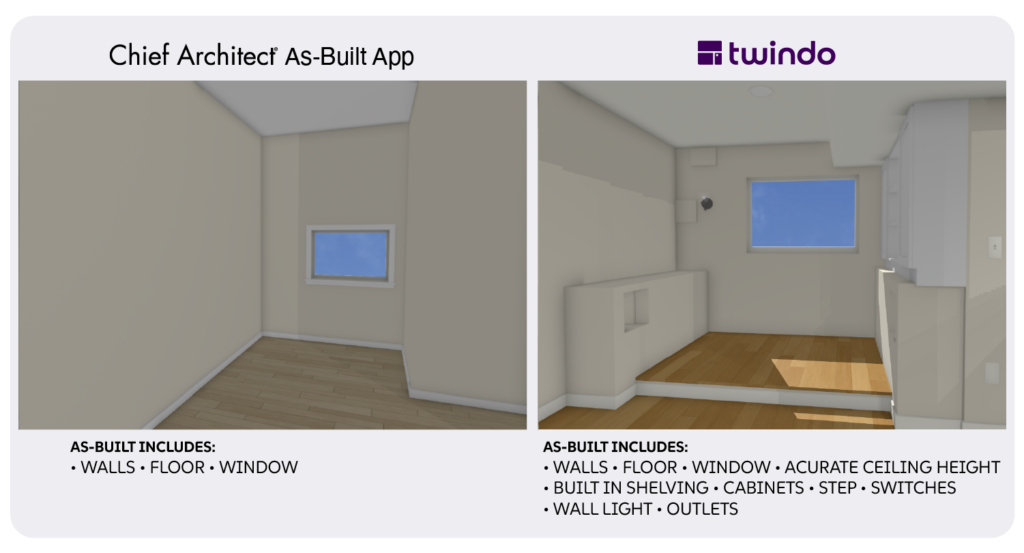
The video above compares how the Chief Architect As-Built App and Twindo model an alcove with built-ins: first the actual space, then each tool’s model. Arrows call out the differences: the raised floor, wall niches, built-in cabinets, wall panels, lighting, and light switches.
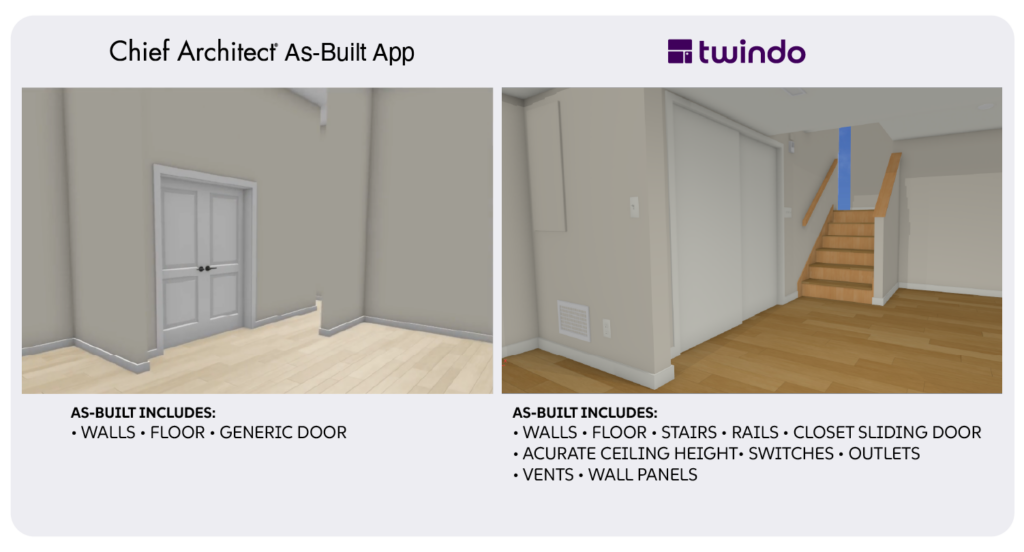
The video above compares how the Chief Architect As-Built App and Twindo models stairs and other details: first the actual space, then each tool’s model. Arrows call out the differences: the stairs and kneewall, HVAC register, wall panel, outlets and switches, and even the closet door type.
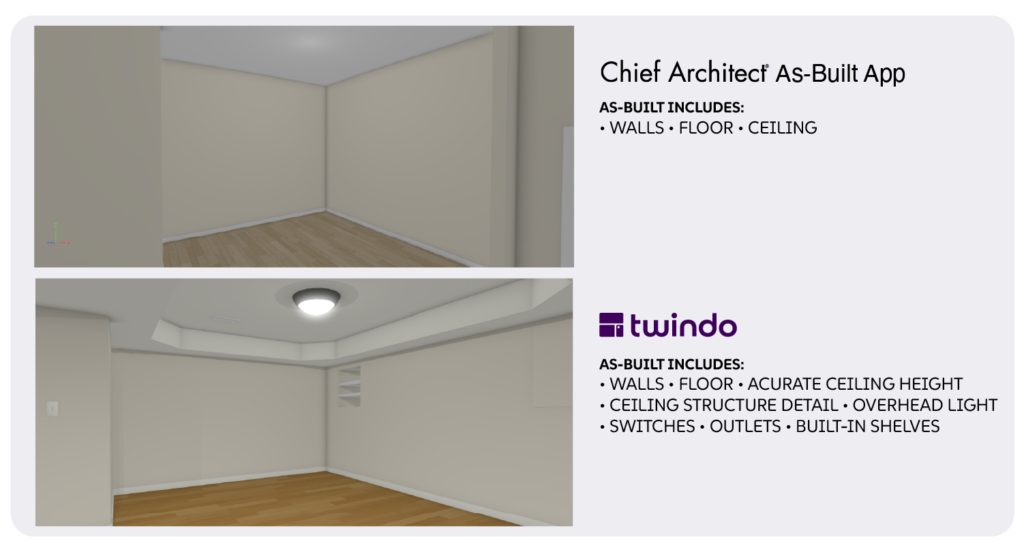
The video above compares how the Chief Architect As-Built App and Twindo models ceilings and other details: first the actual space, then each tool’s model. Arrows call out the differences: the coffered ceiling, built-in shelving, crawlspace access panel.
When the Chief As-Built App makes sense
If you already work in Chief Architect, are documenting a simple, single-floor interior, and you’re comfortable spending the time to clean up the model yourself, it’s a fast, free way to get a basic wall-and-opening shell into your project.
The honest framing, echoed by Chief Architect’s own team, is that the app is “best suited for basic layouts on a single floor.” It’s a capture-and-cleanup tool for people who want to do the modeling work themselves inside Chief Architect.
When Twindo makes sense
The difference shows up the moment a project gets more complex than four walls and a few windows.
- Detail. Twindo’s modeling team details the things that actually drive a remodel scope: cabinetry, countertops, fixtures, fireplaces, outlets, and more. For kitchen, bath, and whole-home work, those details make a real difference.
- Accuracy you can stand behind. Twindo models to roughly 99% accuracy because our own scanning algorithms run on top of Apple’s built-in framework and a trained professional verifies the model, so you’re not the one chasing down every questionable measurement.
- Whole buildings, not just single rooms. Stairs, multiple stories, sloped ceilings, and exteriors are all in scope for Twindo.
- Your time back. Twindo captures entire homes and buildings in minutes and creates design-ready as-builts so you can get right to design. When a single as-built can otherwise eat a day or more (75% of pros in Chief’s own webinar poll said as-builts take a day or more), offloading the detailed modeling work is often the cheaper option once you consider the value of your time.
If you work on projects that require more detail, more accuracy, or more than one room, Twindo becomes the stronger choice. It gives teams a more complete, design-ready as-built they can use with confidence across remodeling, design, and construction workflows.
Get detailed Chief Architect as-builts with Twindo. Start scanning today.
Frequently asked questions
What are the biggest differences between Chief Architect As-Built App and Twindo?
The Chief Architect As-Built App works best in simple spaces and it brings the walls, windows, and openings of an existing space into Chief Architect. Twindo is a robust Scan to CAD service that works in complex spaces and brings highly-detailed as-built models into Chief Architect, and other CAD/BIM programs.
Twindo also provides a measurable and shareable visual scan of your space, as well as a centralized platform to share and manage photos, field notes, and other information about your projects.
Both allow you to invite other people to scan spaces on your behalf.
Does Twindo work with Chief Architect?
Yes. Chief Architect is one of Twindo’s supported export formats, alongside SketchUp, Revit, AutoCAD, 2020 Design, Archicad, Vectorworks, and PDF. You can download an example of our detailed models for your design software here, and refer to our import instructions to work with your existing custom templates.
What are the costs for the Chief Architect As-Built App and Twindo?
The Chief Architect As-Built App is free to use, and Chief Cloud access, which is necessary for moving as-builts from the scanning app to Chief Architect, is free “for a limited time.” Twindo’s scanning is free, with per-square-foot pricing that applies when you order your as-built model. When you compare the true cost of each, factor in your time. With the Chief Architect As-Built App, that means the manual measurements you add to your scan, plus the work of developing its simplified shell into a detailed model.
Can either app scan multiple floors or exteriors?
Twindo supports multistory projects and exteriors. Chief As-Built is interior-only and requires you to scan each floor separately and manually stack them in Chief Architect.
How accurate are these LiDAR as-builts?
Raw LiDAR (including RoomPlan-based capture) is typically accurate to within a few centimeters, but real-world results vary with lighting, glass, mirrors, and obstructions. Chief As-Built addresses this with manual editing and Bluetooth laser input. Twindo delivers roughly 99% accuracy by using our own scanning algorithms and verifying each model with a human modeler.
Which is better for a remodeling project?
For quick, simple interior jobs when you have the time to laser measure and model yourself, the Chief Architect As-Built App could be enough. For detailed, multi-room, multistory or exterior work, Twindo is the best way to deliver a complete as-built.