
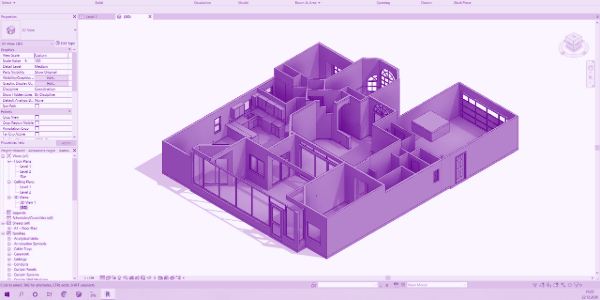
What Makes an As-Built Model Truly Design-Ready?
An as-built model or drawing can look complete at first glance. The measurements are there. The walls are in place. Everything appears to be where it should be.
But when teams talk about a design-ready CAD model, they’re talking about more than whether a file looks correct. They’re talking about whether they can actually work from it.
A design-ready model helps architects, designers, contractors, and engineers move directly into the next phase of a project with confidence. That means accurate geometry, organized information, compatibility with the tools they use every day, and a structure that supports collaboration instead of creating additional cleanup work.
At Twindo, we spend a lot of time thinking about what makes a model usable in real-world workflows. Because the goal isn’t simply to document a space. It’s to create structured as-builts and CAD/BIM files that help teams get to work faster and avoid surprises later.
A Scan Isn’t the Same Thing As a Design-Ready Model
Reality capture technology has made it easier than ever to document existing conditions. Teams can capture spaces with expensive laser scanners, mobile devices, and other sources of spatial data.
But capturing information and organizing information are two different things. Raw capture data often serves as the foundation for a project, but it typically requires additional processing before it becomes a design-ready CAD model or BIM file. Anyone trying to design directly with a point cloud understand this. Teams still need a model that is structured, organized, and aligned with how they actually work.
Alexandru Gîrtan, Twindo’s Operations Manager and an architect by training, explains:
“Every view shows the project from a different perspective. A section shows something different than a plan, and a plan shows something different than a 3D view. A design-ready model needs to show consistent information across all of them.”
In other words, the model needs to tell the same story no matter how you look at it. When information is missing, inconsistent, or difficult to interpret, teams lose time trying to determine what is correct before they can begin designing.
What Does “Design-Ready” Actually Mean?
One of the challenges with the term design-ready is that it means different things to different teams. An interior designer creating client renderings may need a much higher level of visual detail. An architect preparing permit drawings may prioritize accurate existing conditions and clear documentation. An MEP engineer may care more about available space for ductwork and equipment than decorative details.
The exact requirements change, but the underlying goal stays the same: the model should support the work that comes next.
That means a design-ready model should provide:
- Accurate measurements and geometry
- Consistent information across plans, sections, elevations, and 3D views
- Organized layers, elements, and categories
- Natively work with industry-standard CAD and BIM workflows
- A clear understanding of existing conditions
- A foundation for collaboration across project teams
The more confidently a team can begin working from a model, the more design-ready it becomes.
Why Accuracy Is Only Part of the Equation
Accuracy matters. But accuracy alone does not make a model usable. In BIM workflows, information lives inside the model itself. Walls, doors, windows, and other elements are not simply shapes on a screen. They can contain information about materials, dimensions, quantities, and other project data.
When elements are modeled correctly, teams can extract information, generate schedules, coordinate with consultants, and make better-informed decisions. When they’re not, problems start to creep in.
Gîrtan offers a useful analogy:
“Imagine a super-realistic mannequin standing next to a person. At first glance they might both look human. But the mannequin can’t do what a human can do.”
The same applies to models. A model can look complete enough for a rendering while still lacking the structure, relationships, and embedded information required for real project work. A truly design-ready model isn’t just visually complete. It’s built in a way that supports collaboration, coordination, and data extraction.
How Structured Models Reduce Rework
One of the biggest causes of project friction is poorly organized information. Every architecture and design firm has its own standards, naming conventions, workflows, and internal processes. No model can perfectly match every team’s requirements from day one.
However, a well-structured model dramatically reduces the amount of cleanup required before work can begin. At Twindo, models are organized to provide a neutral, reliable starting point that can be adapted to different workflows, whether teams are working in AutoCAD, Revit, or other industry-standard CAD and BIM environments. That means teams spend less time rebuilding information and more time applying their own standards and project-specific requirements.
For some firms, that adjustment may take very little time. For others, additional customization may still be required.The difference is that teams are starting from a trustworthy foundation rather than fixing fundamental problems.
The Real Value: Getting to Work Faster With Confidence
When people think about the value of reality capture and as-built documentation, they often focus on the final file. But the biggest benefit may be everything that happens before and after.
Traditionally, documenting existing conditions could require hours of manual measurements, repeated site visits, and constant verification. Even after the work was complete, teams often found themselves returning to a project site to double-check a dimension or confirm a detail.
Today’s workflows are different. By combining digital capture, structured modeling, and accessible project records, teams can maintain a reliable source of truth throughout the life of a project. That means fewer trips back to the site. Fewer questions about whether a measurement is correct. And greater confidence that everyone is working from the same information.
A design-ready CAD model is valuable because it helps teams move forward from start to finish.
Design-Ready Means Ready to Do the Work
The best models don’t just document a space. They help teams understand it.
A design-ready CAD model combines accurate measurements, parametric objects, structured workflows, and reliable documentation into a format teams can immediately use. It creates a stronger foundation for design, collaboration, estimation, and decision-making.
At Twindo, that’s the standard we aim for with every deliverable. Explore our sample files to see exactly what design-ready outputs look like in practice.
FAQs
What is a design-ready CAD model?
A design-ready CAD model is a structured, organized file that teams can use immediately for design, planning, coordination, or documentation. It includes accurate geometry and information that supports real project workflows.
What is the difference between a scan and a design-ready model?
A scan captures existing conditions and are often delivered as point clouds or 3D meshes. A design-ready model organizes that information into a usable CAD or BIM file that supports design and collaboration.
Why isn’t an accurate model the same thing as a design-ready model?
Accurate measurements are essential, but teams also need organized information, consistent documentation, and properly structured files. A model can be accurate and still require significant cleanup before it is usable.
What is a structured as-built?
A structured as-built is an existing-conditions model that organizes geometry, layers, objects, and project information in a way that supports downstream design and construction workflows.
How much work should teams expect after receiving a Twindo file?
The answer depends on the project and workflow. Many teams can begin working immediately, while others may spend additional time adapting files to their internal standards or increasing the level of detail for specialized use cases. We offer guides on using your custom templates with some of our supported formats.
How does Twindo deliver design-ready models?
Twindo offers three workflows to deliver design-ready models: Scan to CAD, Plan to CAD, and Point Cloud to BIM. While technology accelerates the process, every model is reviewed and refined by experienced professionals to ensure the accuracy, completeness, and organization design teams need. Files are completed and delivered in your preferred format, including Revit, SketchUp, and Chief Architect.