
What’s New in Twindo: Product Updates for February 2026
Twindo is constantly innovating and improving our offerings. In fact, we ship a new version of our scanning app every two weeks, in addition to making other tweaks under the hood on our web app.
We recently rolled out several larger updates designed to simplify your workflow, reduce friction, and make collaboration easier across your projects. Here’s a quick look at what’s new.
1) Invite to Capture is here to help you streamline your process
Essentials and Scale members can now invite collaborators (homeowners, subcontractors, field team members, etc.) to scan spaces remotely and add project-specific Spatial Assets (see update #3!).
That means you can capture more spaces with less effort — understanding real-time site conditions and converting scans into CAD/BIM models from your desk while keeping everything organized in one place inside your Twindo account.
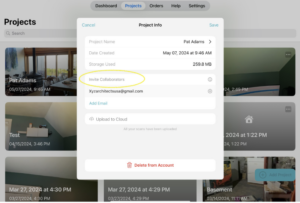
Get a quick overview for Invite to Capture.
Send your first invite on the Twindo Web.
Members will see this feature when creating new projects. Not a member? Learn more about membership perks here.
2) Scan data now syncs across your devices and Twindo Web experience
Previously, projects and scan data could feel “stuck” on a device. Now, once work is uploaded, it’s accessible anywhere you’re signed in — making it much easier to find and share what you need across the web and mobile. Twindo is your single source of truth for projects.
Like most updates, this change is based on direct customer feedback! We love making Twindo easier for you to use every day.
3) You can now add Spatial Assets into specific projects in the Twindo App and the Twindo Web experience
Assets such as photos, notes, and PDFs are stored alongside scans and files within a project and available across devices once uploaded.
Centralized Spatial Assets can help you and your team:
- Easily see which information is current and relevant
- Reduce surprises (and resulting freakouts)
- Know exactly what every project needs
Bottom line – you’ll be able to get your hands on the assets you need faster when everything is in one place.
4) Fewer “Upload” emails (to avoid overwhelming you)
We heard you.
Upload notifications were helpful, but receiving one every single time a scan was uploaded could clutter your inbox.
We implemented a change to stop sending upload notification emails every time you upload a scan. Moving forward, you won’t get an email each time a scan is uploaded.
*One exception: Scale customers will still receive upload notifications when teams they work with upload scans.
5) You may notice emails coming from a new domain
Going forward, some product updates and account-related messages will come from our Twindo email domain. (Curious about the name change? Here’s more about our vision for Twindo.)
If you don’t see an email you’re expecting, it may have landed in the wrong folder. A quick search for “Twindo” should surface it.
Make sure you don’t miss anything from us by adding hello@twindo.com to your address book!
Keep the feedback coming
As always, we’re building Twindo to help you move faster and work smarter. Thanks for being part of the journey — more improvements are on the way.