
3 Ways to Get Your As-Built Files Faster
Projects often slow down during design or construction. But in many cases, the slowdown starts earlier, when a team needs a clear understanding of the existing space and doesn’t have it. That gap between the site and a usable set of as-built files is where time starts to slip and uncertainty compounds.
Traditionally, getting from a real-world space to something usable has required a mix of manual measurement, photos, notes, and reconstruction back at a desk. Even when it works, it’s rarely efficient. Teams spend hours capturing information, then more hours turning it into drawings, only to double-check details later.
What’s changing now is not just speed, but how teams get to a designable starting point. Instead of a single path, there are now multiple ways to move from whatever you have — a physical space, existing plans, or point cloud data — to accurate, usable as-builts much faster.
1. Scan to CAD: The Fastest Way to Get to Design On Site
This is the fastest path to a designable as-built when you have access to the space.
When a team has access to the physical space, scanning is often the most direct way to create as-built files. Instead of measuring room by room, a scan (or multiple scans for larger spaces) captures the geometry of the entire environment and Twindo converts it into CAD/BIM files shortly after.
While a range of LiDAR scanning apps exist, many are focused on capture alone or require additional processing to produce usable CAD or BIM files. With Twindo, that full workflow — from capture to structured, design-ready model — requires only a mobile device, and the result is consistent, accurate, and ready to use across the team.
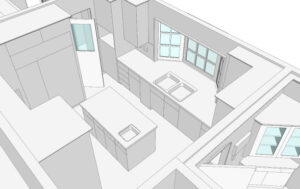
This approach removes much of the manual effort that used to define the process. Teams are no longer relying on handwritten dimensions or trying to reconcile photos with measurements later. Everything is captured in a single pass, and the output is structured and ready to use.
The speed difference is immediately noticeable. Gardner Lloyd from Charlottesville Remodeling Company described it clearly: “It takes about 10 minutes to scan a house with Twindo, and when you get back to the office you already have all the measurements.”
That kind of turnaround changes how projects begin. Instead of dedicating large blocks of time to documenting and modeling a space (in our estimates, 4 to 8 hours measuring and 8 to 16 hours modeling for a 2,000 square foot building), teams can capture it quickly and move forward with confidence.
Speed isn’t the only factor here—accuracy matters, too. Scan to CAD workflows can deliver results within 1% of tape measurements, which gives teams a reliable baseline from the start. What that really means is less time documenting and more time designing. Teams can move directly from capture into usable files without weeks in between.
The impact goes beyond the initial capture. Once the scan is complete and converted, teams across disciplines can begin working from the same information without waiting. With Twindo, that means everyone is working from the same digital twin, not separate files or interpretations. That removes a common bottleneck and helps projects move forward faster.
2. Plan to CAD: Get to Design Without a Site Visit
This is the fastest path to a designable as-built when you already have plans or cannot access the space.
Not every project starts with a site visit. In many cases, teams already have some form of documentation, such as PDFs, legacy CAD/BIM files, or scanned floor plans. Or, you’re working on a space that has yet to be built. The challenge is that these files are often incomplete, inconsistent, or difficult to work with.
Workflows like converting plans or existing drawings into usable CAD models are common across the industry, even if the terminology varies. At Twindo, this is referred to as Plan to CAD, and it focuses on transforming existing documentation into clean, structured drawings and 3D models that can be used immediately. Instead of recreating the space from scratch, teams can build on what they already have and turn it into something reliable with Twindo.
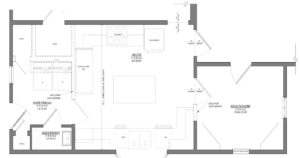
This approach is particularly useful when time is limited,when access to the physical space is not immediate, or when you’re trying to design in 3D but were only given 2D floor plans. It allows teams to move forward without waiting for new measurements, while still improving the quality and usability of the data they are working with. Instead of treating existing plans as a starting point that needs cleanup, this turns them into something design-ready. It’s a faster path from what you have to something you can actually use.
That ability to move directly from input to output reduces friction across the entire process. Instead of cleaning up files or redrawing plans, teams can shift their focus to estimating, design, and decision-making. The result is a faster start without sacrificing clarity or structure. Within Twindo, those outputs connect directly to the same shared model used across projects, instead of living as isolated files.
3. Point Cloud to BIM: Get to Design With Full Detail
This is the fastest path to a designable as-built when you already have a point cloud.
Some projects require spatial data that goes beyond the LiDAR range of an iPhone or iPad, especially when working on larger spaces or more complex builds. Or, you may already have point cloud data and still need a workable as-built.
In those cases, point cloud data can be converted into BIM models that provide a more comprehensive representation of the space. Across the industry, this process often still involves significant manual modeling to translate raw point cloud data into usable BIM outputs. With Twindo, that is handled within the workflow itself, reducing the amount of manual reconstruction required while keeping models connected to the same underlying spatial data as every other workflow.
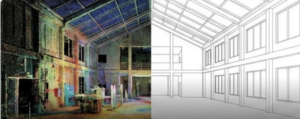
This workflow is designed for situations where teams may have invested in laser surveys, but are stuck with uneditable point cloud data. Instead of working from simplified drawings, teams receive a model that captures the nuances of the environment and supports more advanced coordination.
Even at this level of detail, the process is significantly faster than traditional modeling approaches. What used to require extensive manual effort can now be delivered in a fraction of the time. The advantage here is that higher detail no longer slows teams down. You still get a model you can design from, without the long lead time that usually comes with it.
By reducing the time required to generate detailed models, teams can spend more of their effort on design, coordination, and execution rather than reconstruction.
One System That Supports All Three
The reality for most teams is that no single workflow applies to every project. Some situations call for a scan, others rely on existing plans, and some utilize a point cloud. The challenge has always been that these workflows exist in isolation, each with its own tools, outputs, and limitations. What changes the equation is not just having multiple options, but having multiple ways to get to the same outcome: a designable as-built, faster.
That’s the role Twindo plays: turning spatial intelligence into something teams can actually work from. When scan data, converted plans, and CAD/BIM models can all live in the same environment, they stop being disconnected deliverables and start becoming part of a shared foundation.
That shared foundation allows teams to work from the same understanding of a space, regardless of how the data was created. Across these workflows, outputs are typically delivered at LOD 200, providing a consistent and usable level of detail for design, estimation, and coordination. It also means that different workflows can coexist across projects without introducing inconsistencies or additional complexity.
Ryan Moss from Jeff Adams Design noted the difference in day-to-day work, saying, “It’s significantly improved our workflow and time efficiency.”
Instead of forcing teams to choose one method and adapt everything else around it, this approach supports flexibility. Teams can use the process that fits the situation and still maintain continuity across their work.
Faster As-Builts Lead to Better Outcomes
Speed is the most obvious benefit of these workflows, but the impact extends further than that. When as-built files are delivered quickly and accurately, they reduce uncertainty at the very beginning of a project. That clarity carries through every stage that follows.
Design decisions can be made earlier. Estimates are based on reliable information. Teams spend less time verifying measurements and more time focusing on the work that moves the project forward.
Over time, those gains add up. Michaela Shields from M Shields Design described how the shift affected her business, saying, “I used to handle about 8–9 jobs at a time. Now I can run 40–50.”
That kind of change is not just about efficiency. It reflects a broader shift in how teams operate when the initial step of understanding a space is no longer a bottleneck.
As-built workflows aren’t just about documentation anymore. They’re about how quickly a team can get to design. And that’s what ultimately changes how projects move.
Ready to fast track your projects?
Learn more about Scan to CAD, Plan to CAD, and Point Cloud to BIM.
FAQs
1. How accurate are scan-based as-built files?
Twindo CAD/BIM models can be accurate within about 1% of traditional tape measurements. That level of accuracy is typically reliable enough for design and estimating, while reducing the need for repeat site visits.
2. Can you create as-built files without visiting the site?
Yes. Existing documents like PDFs, floor plans, or legacy CAD/BIM files can be converted into structured, design-ready models, allowing teams to begin work without a site visit.
3. What level of detail do as-built models typically include?
Twindo models are delivered at LOD 200, which provides a consistent level of detail suitable for design, estimation, and coordination without adding unnecessary complexity.
4. What is the fastest way to create as-built files?
The fastest method depends on your starting point. Scanning is quickest when you can access the space, converting plans is fastest when you already have drawings, and converting a point cloud is the best option when detailed scan data exists.
5. What are as-built files?
As-built files are accurate drawings or 3D models that reflect the real, current conditions of a space. They serve as the foundation for design, estimating, and construction because they show what actually exists, not just what was planned.